
Version Control
Version Control is an crucial function within Blueprint. This functionality is available via the Document Full View page.
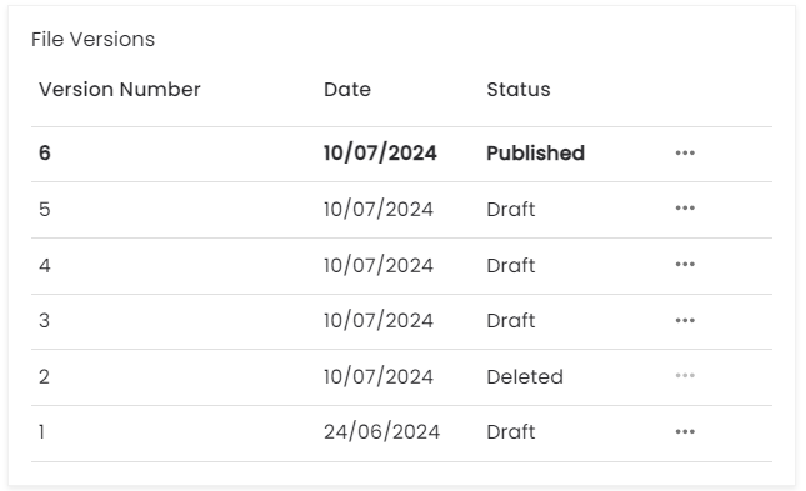
All Document Versions will show within this list along with the following statuses:
Published - only one version can be listed as Published
Draft
Deleted - these versions can no longer be accessed
Each Draft/Published version can be modified by using the context menu on the right hand side of the row. The available features are detailed below:
View Version
Allows you to select a specific Document Version to view. This is only available for Draft/Published versions
Publish Version
This is only available for Version in a Draft state and is a key process for the Review process. Once a Document Version is published it will become available to anyone with access to Blueprint. You can also Unpublish a published version.
Edit Version
Allows you to Edit a Document Version. This will download the Document to your local file storage. When this function is selected the Document Version will be placed in a locked state until it is checked back in within Blueprint.
Once in an editing state you will have two options available to you:
Commit Edit
Discard Edit
Committing the edit provides the ability to upload the new file and confirm the changes. You can Discard your edit at any time returning the version to its previous Draft state
This is only available for Versions which are in a Draft state
This functionality is feature driven via the ‘Edit Document Content’ feature and can be enabled/disabled via Feature Enablement.
This functionality also requires the ‘Edit Document Contents’ permission. You can also enable the permission for ‘Discard Other Users Edits’ which will give you the ability to discard edits that other users have stated. These can be configured within Application Roles.
Clone Version
This allows you to create a brand new Version of the Document. Once clicking this option the new Version will be created and Blueprint will navigate you to the new Version. This will be created in a Draft status and allow you to carry out the other functionality such as Edit.
Move Version
This functionality will allow you to move this version to another Document within Blueprint. Clicking this option opens the Move Document Version modal and will allow you to:
Search and select the Document you wish to move the Version to
Set the moving version to be the Published version of the new target Document
Upon completion you will be navigated to the target Document where the version has been moved to. It will show in either a Draft or Published status dependant on the option you have selected.
The old version within the original Document will be marked as Deleted and not available to select from within that Document.
This functionality requires the ‘Move Document Versions’ permission configured within Application Roles.
Delete Version
This allows you to Delete a specific Version of the Document. This is available for both Draft and Published versions and once complete can not be reversed.
This option is only available provided there is more than one Draft/Published Document Version attributed to the Document. If you want to delete the last remaining version then you will need to Delete the entire Document. Further details on this can be found within the Maintenance section of the User Guide
This functionality requires the ‘Delete Document Versions’ permission configured within Application Roles.
Download Version
This allows a User to Download a Document to their Local File Storage.
This functionality is feature driven via the ‘Download’ feature and can be enabled/disabled via Feature Enablement.
This functionality also requires the ‘Download Document Versions’ permission configured within Application Roles.