
Contexts
Within this settings page users can assign Fields to a particular part of the Blueprint application. As an example during the Document Nomination process you are able to attach metadata to a Document within this section:
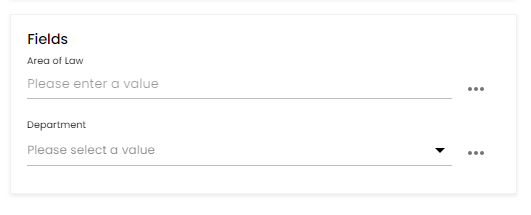
These Fields have been configured specifically for this Context as shown below:
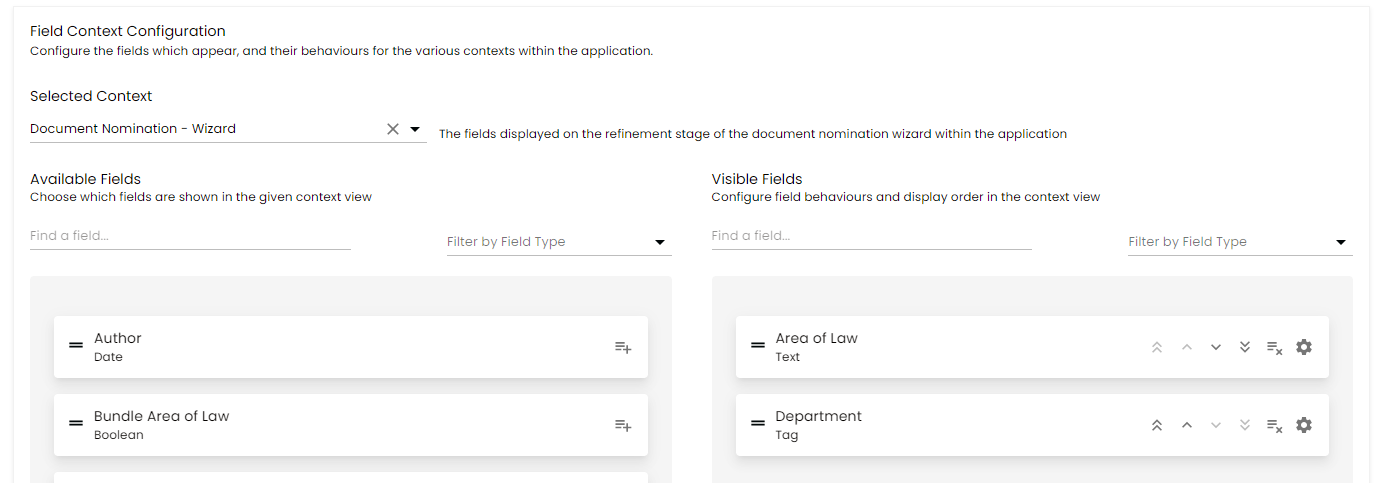
Amending a Context
To amend a specific Context you will need to select an option from the dropdown menu. The options available are:
Document Nomination - Wizard
Document View - Full View
Document View - Quick View
Document View - Catalogue
Document View - Awaiting Review
Knowledge Bundle - Create
Knowledge Bundle View - Full View
Knowledge Bundle View - Quick View
Knowledge Bundle View - Catalogue
Upon selecting an option you will be presented with the following field lists:
Available Fields - This is the list of enabled Fields that are not currently shown within this Context
Visible Fields - This is the list of Fields currently being shown within the Context
You can drag and drop across these sections to move Fields and also reorder the list within the Visible Fields section. There are also icons available if you do not want to use drag and drop.
The Fields and the order of Fields set within the Visible section will then appear within the specific area of Blueprint.
Setting Mandatory Fields
You can click the Settings icon next to any Visible field and it will open a settings modal where you can select the option to make a Field mandatory.
Please note this will only make the Field mandatory within this specific Context. When User navigate to this area of Blueprint and amend the metadata they will be forced to enter a value for this Field.
Any Fields within the Visible fields section that have an asterisk '*' next to the name have already been set as mandatory.
Setting Practice Group Reviewer only Fields
You can click the Settings icon next to any Visible field and it will open a settings modal where you can select the option to make a Field visible only to Users who are set as a Reviewer in any Practice Group.
When users are navigating to a specific context and they are not a Practice Group Reviewer they will only see the Fields that have not been set to PG Reviewers only.