
Practice Groups
Within this section Users can configure a Practice Group. This allows groups of users to be configured as Reviewers for a specific or for multiple groups. Documents can then be attributed to a Practice Group within Blueprint.
Multiple Practice Groups can be added and edited within this settings page. When clicking either ‘Add’ or ‘Edit’ a modal will appear allowing you to enter a Practice Group name and assign Reviewers to the group.
All Documents within Blueprint will need to be assigned to a Practice Group. This will be a mandatory requirement during the Nomination workflow.
Practice Groups can be deleted within this page provided that there are no Documents within Blueprint attributed to the group.
Reviewers
Any Users assigned as Reviewers will be attributed to the following events and permissions:
Reviewers will receive the New Document Nomination email configured for Reviewers any time a Document is nominated that is linked to one of their Practice Groups
Reviewers will have the ability to Approve/Reject nominated Documents linked to one of their Practice Groups
Reviewers will be able to amend the Practice Groups for Documents linked to one of their Practice Groups (they will not be able to assign this to a group for which they are not a Reviewer)
Reviewers will be able to amend metadata for Documents linked to one of their Practice Groups
Reviewers will be able to carry out the following Document/Version features for Documents linked to one of their Practice Groups:
Publish/Unpublish
Edit Content
Clone
Move
Delete Version
Enable/Disable Live Linking
Carry out Document Maintenance tasks (Merge, Archive and Delete)
Reviewer abilities sit below the Feature Enablement and Application Roles levels. As an example in order to have the Clone feature available this will need to be an enabled feature and the User will need the Manage Document Versions permission. Provided both of these are enabled and they are a Reviewer for the Document’s practice group they will then be able to Clone Document versions.
Review Configuration
Each practice group can be customised to set Next Review Dates for any Documents assigned to the Practice Group.
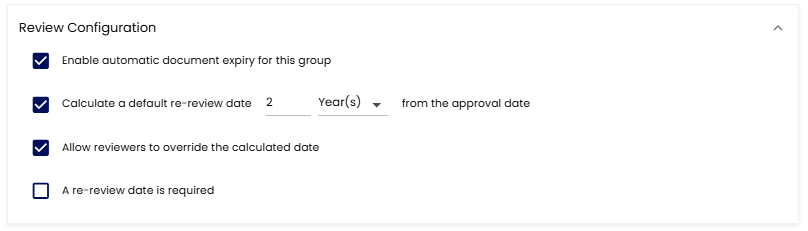
This configuration will allow for Next Review Dates to be accessible and can be defaulted to a specific calculation as shown above.
Reviewers of the Practice Group will be able to update the Next Review Date from the Document Full View Page.