
AI Suggestions
Introduction
The AI suggestions feature allows users to get suggested values during the nomination process from a configured AI.
During the nomination process, the AI suggests values for the relevant fields in the form. Users can review the suggestions and edit, add to, or remove them as needed. If the AI can’t confidently provide a suggestion for a field, it will leave that field blank.
This is reflected in the UI, with icons that appear against fields after the AI has made a suggestions.

AI has made a suggestion for this field
AI has not been able to make a suggestion for this field and has left the value blank
Setup
In order to activate the feature, an AI provider must have been setup in the backend configuration of Blueprint. Please contact us through Support (devsupport@tigereyeconsulting.com) if you would like to activate this feature and we can help you set it up correctly.
Please follow the following guide to technically setup the feature Setting up Azure Open AI through Foundry
Once configured, the feature will be able to be activated within the Settings area of Blueprint. This will require an Administrator to be able to configure.

Field configuration
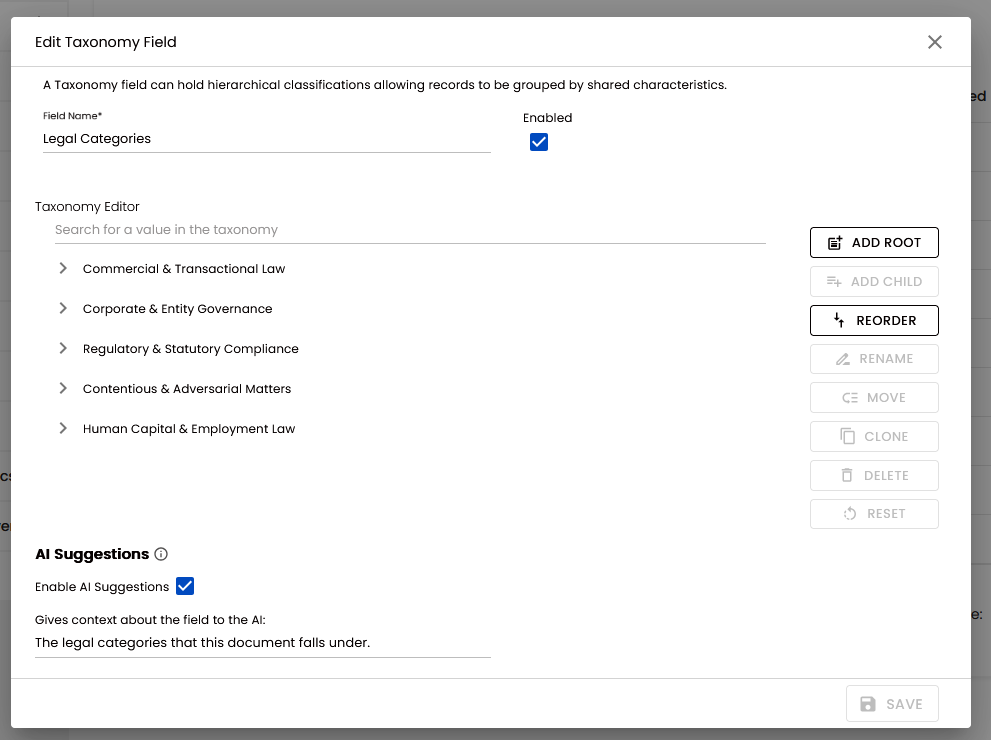
Each field in Blueprint will need to be enabled and a context given before an AI suggestion will be given in the document nomination screen. The supported field types can be seen in Support.
Fields can be configured in the Fields section of Settings in Blueprint, inside of the Edit modal. This requires an Administrator to be able to configure.
There is a section of this modal called AI suggestions, and two fields are present:
Name | Description |
|---|---|
Enable AI suggestions | Whether or not suggestions will be given for this field on the document nomination screen |
Gives context about the field to the AI | This is included in the prompt that is sent to the AI and gives the AI context about this field |
Tag fields
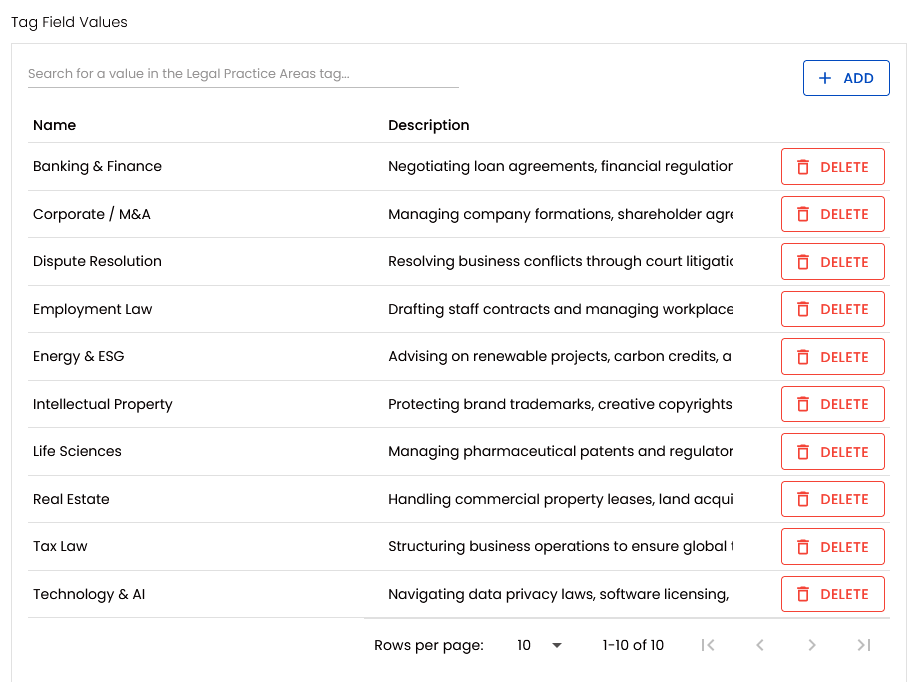
Tag fields also have a description that is set against each tag field value that the AI is able to use for context, so it's important to ensure these are filled in and accurate for the best results.
Context guidance and tips

The AI can make mistakes and will provide suggestions based on the context and guidance given to it. The following is guidance about what can be entered, however it cannot be guaranteed that including formatting or other specifics will be adhered to.
It’s always important to validate the output of AI.
A concise description about the field is sometimes enough to yield good results, for example "Key legal practice areas that the document covers." is a good context for a tag field called 'Legal Practice Areas'.
However there is a lot of power in the context and adding the following things can potentially yield better results:
The text format you you want the result in, for example a name text field called Author could have the following "The name of the author of this document, format in capital name case."
The typical location and label of the value: "... typically found on the first page with a 'Reference:' label."
If the field has a specific format you're looking for, for example "... in format XXX-YY-ZZZZ".
Ensure a blank value is given when not found, for example "... if not found leave blank.".
Pricing options
Pricing works based upon the data you send (prompt) and the data you receive back (competition). This is broken down by tokens, more information on this can be found here: https://learn.microsoft.com/en-us/dotnet/ai/conceptual/understanding-tokens
Pricing is currently a moving target. As of May 2026 the following consumption and costs can be assumed based upon a single spaced text document of around 60 pages:
Model | Prompt tokens | Prompt cost | Completion tokens | Completion cost | Total cost of document |
|---|---|---|---|---|---|
| 32,488 tokens | 0.04 GBP | 430 tokens | 0.005 GBP | 0.045 GBP |
* - At time of writing, output costs £11.12 per 1M tokens, with the consumption rounded up.
Considerations
Caching: Pricing can decrease due to prompt caching. This can typically be seen when sending the same document for suggestions.
Manage models: Models have a knowledge cut-off and a retirement date
Manage consumption: Foundry portal allows you to see your consumption and manage quotas
Reducing the DocumentMaxTextLength can reduce the Prompt tokens per request, lowering cost. However this may give an AI less context. Balance this with the quality of results.
Support within Blueprint
The following AI providers are supported
OpenAI through Azure Foundry
The following fields are supported:
Description
Text fields
Taxonomy fields
Tag fields
And text based document formats are supported:
Docx
Pdf
Basic text files such as .txt, .md, .rtf etc.