
Once a Knowledge Bundle has been added to the Blueprint application users will be able to search for Bundles. There are multiple ways to search for Bundles within Blueprint.
Bundles Search Box
This search option is only available on the Bundle Catalogue page. This is a keyword search and searches the title, description and ID of the Bundles contained within Blueprint.

Advanced Filters
In addition to the Search Options above, users can apply additional filters to their search criteria. Accessed by the ‘Advanced’ button to the right of the Bundles Search Box. Clicking this button will open the Bundles Search Filters modal:
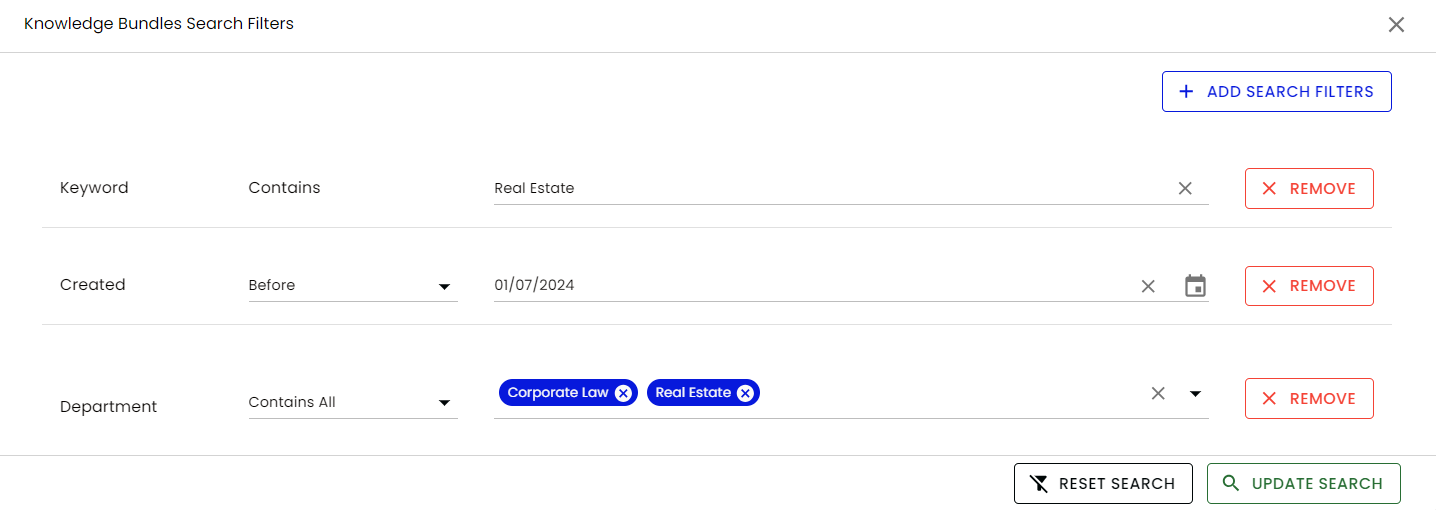
From here users can select multiple filters for example:
-
Keyword - This searches any Title, Description and ID for the search criteria entered
-
Title - This is a specific search on Bundle titles
-
Description - This is a specific search on Bundle descriptions
-
Updated - This allows the filtering of the last time Bundles were updated
-
Created - This allows filtering based on the date the Bundles were created
-
Plus all custom Fields that have been created within Fields.
Search refining
Each Field will have options to further refine the filtering criteria for example Date fields allow you to search Before, After, On and Between dates and Taxonomy fields allow you to search Contains All, Contains Any, Has Only, Is Empty and Is Not Empty. Other Field types have similar options available.
Select multiple filters
Multiple fields can be selected as criteria which function as ‘AND’ searching. i.e. in the above example the search would identify Bundles where:
-
The phrase ‘Real Estate’ appears within the Title and Description. AND
-
Bundles last updated before 01/07/2024. AND
-
Contains all of the following values within the Department Field:
-
Corporate Law
-
Real Estate
-